How to Crop Amazon Labels for Thermal Printing
Processing orders on Amazon Seller Central is the heartbeat of millions of businesses worldwide. However, Amazon's default PDF generation for shipping labels is heavily optimized for traditional A4 laser printers, not the modern 4x6 inch thermal printers that professional warehouses rely on.
Whether you are utilizing Amazon Easy Ship, FBA (Fulfillment by Amazon), or Seller Flex, manually cutting and taping A4 sheets slows down your dispatch metrics. In this comprehensive guide, we will analyze the precise layout of Amazon's ATS (Amazon Transportation Services) labels, explain why DPI preservation is critical for scanning, and show you how to automate your cropping workflow.
1. The Amazon A4 Label Structure
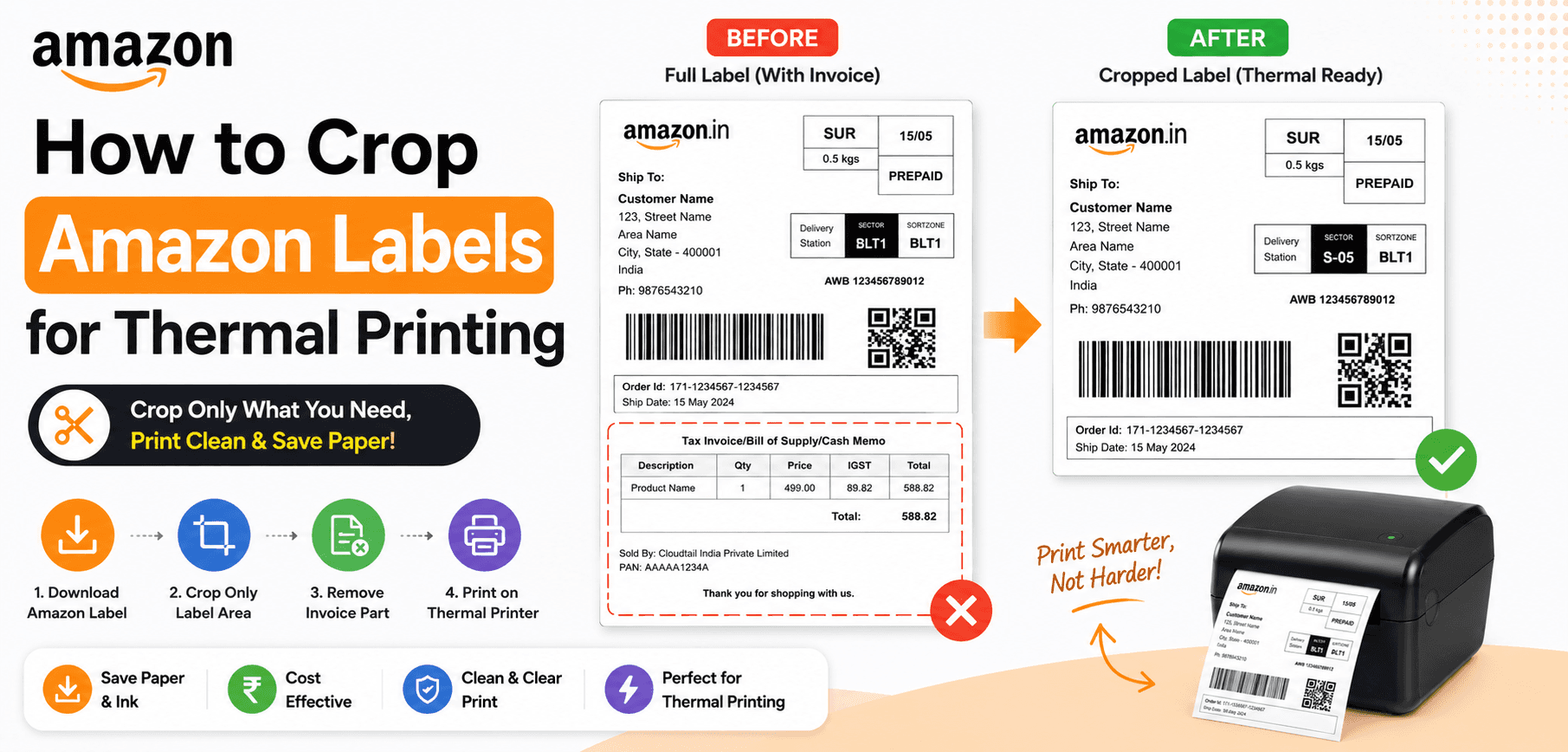
When you bulk-download orders from Amazon Seller Central, the system generates a standard A4 PDF (210mm x 297mm). The top half contains the ATS routing code, barcode, and customer shipping address. The bottom half contains the GST tax invoice and itemized product list.
The Shrink Problem
If you send the A4 file straight to a thermal printer (like a TSC TE244), it shrinks the entire page to fit a 4-inch width. This causes the intricate lines of the barcode to blur together.
The ATS Requirement
Amazon Transportation Services (ATS) uses automated laser scanners in their hubs. If the barcode is rasterized or shrunk, the scanner fails, leading to delayed fulfillment metrics.
2. How the Amazon Cropper Solves This
Our Amazon Label Cropper utilizes precise vector bounding boxes. Instead of converting your document into a low-quality image, cutting it, and converting it back to a PDF, our tool modifies the PDF's internal CropBox matrix.
It slices the document exactly in half at the 148.5mm horizontal mark. Page 1 becomes the top half (the shipping label) perfectly formatted to a 4x6 (100x150mm) aspect ratio. Page 2 becomes the bottom half (the invoice). You can then print this multi-page document sequentially directly onto your thermal roll.
3. Zero-Knowledge Privacy for Sellers
As a seller, you are legally responsible for the PII (Personally Identifiable Information) of your customers, including their full names, physical addresses, and contact numbers.
Secure Local Processing
Never upload unencrypted customer orders to random internet servers! SmartPDFs Pro uses WebAssembly to execute the cropping algorithm entirely within your browser. The PDF is processed using your local computer's memory. No sensitive data is ever transmitted to our cloud servers.
4. Automated Workflow Tutorial
Transform your dispatch process with these four simple steps:
- 1
Export from Seller Central
In your Amazon Seller Central dashboard, select your pending orders and click "Print Packing Slips". Save the resulting combined PDF.
- 2
Upload to SmartPDFs Pro
Drag the massive A4 PDF into the Amazon Cropper interface.
- 3
Instant Split
The tool will automatically duplicate and slice every page. A 50-page A4 PDF instantly becomes a 100-page 4x6 thermal PDF.
- 4
Print via Thermal
Open the generated PDF, select your thermal printer (Zebra, Rollo, TVS), ensure the media size is set to 4" x 6", select "Fit to Printable Area", and print.
Frequently Asked Questions
Will the ATS scanner read the cropped barcode?
Yes. Our tool preserves the original vector paths of the barcode. It does not rasterize or reduce the DPI, ensuring flawless scans at the fulfillment center.
Does this work for Amazon FBA labels?
Yes, this tool is designed for standard Amazon shipping layouts, including Easy Ship, FBA inbound labels, and Seller Flex.
Is it free to use?
Yes, the Amazon Label Cropper is completely free to use directly in your web browser.
Upgrade Your Amazon Fulfillment
Stop folding A4 paper. Automate your Amazon label cropping and print directly to thermal rolls in seconds.